[Day24] k8s進階篇延伸與EKS(二):Scheduling
Author: Nick Zhuang
Type: kubernetes
前言
今天我們主要來探討關於“排程”,也就是所謂的Scheduling這件事情,牽涉到這類的功能有:Affinity and Anti-Affinity、Taints and Tolerations、Cordon and Uncordon、Drain等等,接下來的時間,我們就來綜合運用操作一下,體驗下在AWS上集群操作和minikube有何不同。
進階篇(下)
我們來測試一個簡單的例子,模擬一般日常維運時可能會有的操作
這個例子會結合NodeAffinity、Taints and Tolerations、Cordon and Uncordon、Drain的觀念
步驟如下:
- 集群內有兩個節點,分別為A、B
- 將ReplicaSet=2且NodeAffinity為machine=maintain的Deployment部署到集群上
- 檢查集群Pod狀態,此時AB上都可見其對應的Pod
- 將A設定Drain,這時候A上的Pod會轉移到B上,檢查集群Pod就看到
- 將A設定Uncordon,這時候A可以調度了
- 將A設定Taint,如果沒有Toleraion就不能調度到A上
- 重啟Deployment,這時候Pod還是只會調度到B上
- 修改Deployment,A增加Toleraion
- 重啟Deployment,這時候Pod會調度在A、B上
複習傳送門:
[Day13]k8s進階篇(四):Affinity and Anti-Affinity、Taints and Tolerations
[Day17]k8s管理篇(三):User Management、RBAC、Node Maintenance
檢查集群的節點狀態
$kubectl get nodes
NAME                                               STATUS   ROLES    AGE     VERSION
ip-192-168-41-48.ap-southeast-1.compute.internal   Ready    <none>   3h15m   v1.13.8-eks-cd3eb0
ip-192-168-66-13.ap-southeast-1.compute.internal   Ready    <none>   3h15m   v1.13.8-eks-cd3eb0
這裡的意思是他有開了兩台計算節點,也就是Slave,兩個EC2,我們複習下:
Elastic Compute Cloud(EC2) ,是由 亞馬遜公司 提供的 Web服務,是一個讓使用者可以租用 雲端 電腦運行所需應用的系統。EC2藉由提供Web服務的方式讓使用者可以彈性地運行自己的機器映像檔,使用者將可以在這個 虛擬機器 上運行任何自己想要的軟體或應用程式,也可以隨時建立、執行、終止自己的虛擬伺服器,使用多少時間算多少錢,也因此這個系統是「彈性」使用的。EC2讓使用者可以控制執行虛擬伺服器的主機地理位置,這可以改善讓延遲還有備援性例如,為了讓系統維護時間最短,用戶可以在每個時區都運行自己的虛擬伺服器。
在這裡可以看到
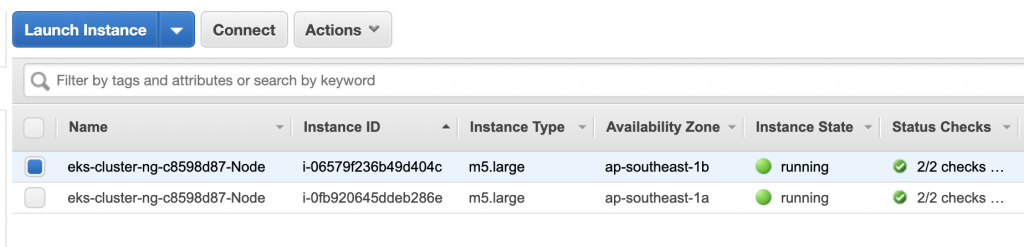
我們前面有提過,主節點是看不到的,也就是Master,因為它是由EKS所管理。
我們再詳細看下節點狀態
$kubectl describe nodes
Name:               ip-192-168-41-48.ap-southeast-1.compute.internal
Roles:              <none>
Labels:             alpha.eksctl.io/cluster-name=eks-cluster
                    alpha.eksctl.io/instance-id=i-0fb920645ddeb286e
                    alpha.eksctl.io/nodegroup-name=ng-c8598d87
                    beta.kubernetes.io/arch=amd64
                    beta.kubernetes.io/instance-type=m5.large
                    beta.kubernetes.io/os=linux
                    failure-domain.beta.kubernetes.io/region=ap-southeast-1
                    failure-domain.beta.kubernetes.io/zone=ap-southeast-1a
                    kubernetes.io/hostname=ip-192-168-41-48.ap-southeast-1.compute.internal
Annotations:        node.alpha.kubernetes.io/ttl: 0
                    volumes.kubernetes.io/controller-managed-attach-detach: true
CreationTimestamp:  Wed, 09 Oct 2019 10:50:50 +0800
Taints:             <none>
Unschedulable:      false
Conditions:
    Type             Status  LastHeartbeatTime                 LastTransitionTime                Reason                       Message
    ----             ------  -----------------                 ------------------                ------                       -------
    MemoryPressure   False   Wed, 09 Oct 2019 14:22:51 +0800   Wed, 09 Oct 2019 10:50:50 +0800   KubeletHasSufficientMemory   kubelet has sufficient memory available
    DiskPressure     False   Wed, 09 Oct 2019 14:22:51 +0800   Wed, 09 Oct 2019 10:50:50 +0800   KubeletHasNoDiskPressure     kubelet has no disk pressure
    PIDPressure      False   Wed, 09 Oct 2019 14:22:51 +0800   Wed, 09 Oct 2019 10:50:50 +0800   KubeletHasSufficientPID      kubelet has sufficient PID available
    Ready            True    Wed, 09 Oct 2019 14:22:51 +0800   Wed, 09 Oct 2019 10:51:40 +0800   KubeletReady                 kubelet is posting ready status
Addresses:
    InternalIP:   192.168.41.48
    ExternalIP:   18.140.71.217
    Hostname:     ip-192-168-41-48.ap-southeast-1.compute.internal
    InternalDNS:  ip-192-168-41-48.ap-southeast-1.compute.internal
    ExternalDNS:  ec2-18-140-71-217.ap-southeast-1.compute.amazonaws.com
Capacity:
    attachable-volumes-aws-ebs:  25
    cpu:                         2
    ephemeral-storage:           20959212Ki
    hugepages-1Gi:               0
    hugepages-2Mi:               0
    memory:                      7865400Ki
    pods:                        29
Allocatable:
    attachable-volumes-aws-ebs:  25
    cpu:                         2
    ephemeral-storage:           19316009748
    hugepages-1Gi:               0
    hugepages-2Mi:               0
    memory:                      7763000Ki
    pods:                        29
System Info:
    Machine ID:                 ec206f78dc514867b23ad65d916508a3
    System UUID:                EC206F78-DC51-4867-B23A-D65D916508A3
    Boot ID:                    efa24a06-8f94-4262-8b25-66f60b68fab7
    Kernel Version:             4.14.133-113.112.amzn2.x86_64
    OS Image:                   Amazon Linux 2
    Operating System:           linux
    Architecture:               amd64
    Container Runtime Version:  docker://18.6.1
    Kubelet Version:            v1.13.8-eks-cd3eb0
    Kube-Proxy Version:         v1.13.8-eks-cd3eb0
ProviderID:                  aws:///ap-southeast-1a/i-0fb920645ddeb286e
Non-terminated Pods:         (2 in total)
    Namespace                  Name                CPU Requests  CPU Limits  Memory Requests  Memory Limits  AGE
    ---------                  ----                ------------  ----------  ---------------  -------------  ---
    kube-system                aws-node-ctbwc      10m (0%)      0 (0%)      0 (0%)           0 (0%)         3h32m
    kube-system                kube-proxy-76wpl    100m (5%)     0 (0%)      0 (0%)           0 (0%)         3h32m
Allocated resources:
    (Total limits may be over 100 percent, i.e., overcommitted.)
    Resource                    Requests   Limits
    --------                    --------   ------
    cpu                         110m (5%)  0 (0%)
    memory                      0 (0%)     0 (0%)
    ephemeral-storage           0 (0%)     0 (0%)
    attachable-volumes-aws-ebs  0          0
Events:                       <none>


Name:               ip-192-168-66-13.ap-southeast-1.compute.internal
Roles:              <none>
Labels:             alpha.eksctl.io/cluster-name=eks-cluster
                    alpha.eksctl.io/instance-id=i-06579f236b49d404c
                    alpha.eksctl.io/nodegroup-name=ng-c8598d87
                    beta.kubernetes.io/arch=amd64
                    beta.kubernetes.io/instance-type=m5.large
                    beta.kubernetes.io/os=linux
                    failure-domain.beta.kubernetes.io/region=ap-southeast-1
                    failure-domain.beta.kubernetes.io/zone=ap-southeast-1b
                    kubernetes.io/hostname=ip-192-168-66-13.ap-southeast-1.compute.internal
Annotations:        node.alpha.kubernetes.io/ttl: 0
                    volumes.kubernetes.io/controller-managed-attach-detach: true
CreationTimestamp:  Wed, 09 Oct 2019 10:50:49 +0800
Taints:             <none>
Unschedulable:      false
Conditions:
    Type             Status  LastHeartbeatTime                 LastTransitionTime                Reason                       Message
    ----             ------  -----------------                 ------------------                ------                       -------
    MemoryPressure   False   Wed, 09 Oct 2019 14:22:51 +0800   Wed, 09 Oct 2019 10:50:49 +0800   KubeletHasSufficientMemory   kubelet has sufficient memory available
    DiskPressure     False   Wed, 09 Oct 2019 14:22:51 +0800   Wed, 09 Oct 2019 10:50:49 +0800   KubeletHasNoDiskPressure     kubelet has no disk pressure
    PIDPressure      False   Wed, 09 Oct 2019 14:22:51 +0800   Wed, 09 Oct 2019 10:50:49 +0800   KubeletHasSufficientPID      kubelet has sufficient PID available
    Ready            True    Wed, 09 Oct 2019 14:22:51 +0800   Wed, 09 Oct 2019 10:51:40 +0800   KubeletReady                 kubelet is posting ready status
Addresses:
    InternalIP:   192.168.66.13
    ExternalIP:   13.229.86.100
    Hostname:     ip-192-168-66-13.ap-southeast-1.compute.internal
    InternalDNS:  ip-192-168-66-13.ap-southeast-1.compute.internal
    ExternalDNS:  ec2-13-229-86-100.ap-southeast-1.compute.amazonaws.com
Capacity:
    attachable-volumes-aws-ebs:  25
    cpu:                         2
    ephemeral-storage:           20959212Ki
    hugepages-1Gi:               0
    hugepages-2Mi:               0
    memory:                      7865400Ki
    pods:                        29
Allocatable:
    attachable-volumes-aws-ebs:  25
    cpu:                         2
    ephemeral-storage:           19316009748
    hugepages-1Gi:               0
    hugepages-2Mi:               0
    memory:                      7763000Ki
    pods:                        29
System Info:
    Machine ID:                 ec2b79d38b6086059acbbc1ee59fecfe
    System UUID:                EC2B79D3-8B60-8605-9ACB-BC1EE59FECFE
    Boot ID:                    1b2c2493-8c4a-4930-92ea-5086dd7a4d77
    Kernel Version:             4.14.133-113.112.amzn2.x86_64
    OS Image:                   Amazon Linux 2
    Operating System:           linux
    Architecture:               amd64
    Container Runtime Version:  docker://18.6.1
    Kubelet Version:            v1.13.8-eks-cd3eb0
    Kube-Proxy Version:         v1.13.8-eks-cd3eb0
ProviderID:                  aws:///ap-southeast-1b/i-06579f236b49d404c
Non-terminated Pods:         (4 in total)
Namespace                  Name                        CPU Requests  CPU Limits  Memory Requests  Memory Limits  AGE
    ---------                  ----                        ------------  ----------  ---------------  -------------  ---
    kube-system                aws-node-mrnzb              10m (0%)      0 (0%)      0 (0%)           0 (0%)         3h32m
    kube-system                coredns-5d8659f47b-f4gc6    100m (5%)     0 (0%)      70Mi (0%)        170Mi (2%)     3h37m
    kube-system                coredns-5d8659f47b-qrxh5    100m (5%)     0 (0%)      70Mi (0%)        170Mi (2%)     3h37m
    kube-system                kube-proxy-p4prg            100m (5%)     0 (0%)      0 (0%)           0 (0%)         3h32m
Allocated resources:
    (Total limits may be over 100 percent, i.e., overcommitted.)
    Resource                    Requests    Limits
    --------                    --------    ------
    cpu                         310m (15%)  0 (0%)
    memory                      140Mi (1%)  340Mi (4%)
    ephemeral-storage           0 (0%)      0 (0%)
    attachable-volumes-aws-ebs  0           0
Events:                       <none>
可以注意到兩個節點的Taint都沒有設置,相較於minikube,有增加了一些內容:
- ●
attachable-volumes-aws-ebs:這個是AWS才有的參數,意思是說可以將EBS中的Volume附加到節點上的數量,這裡是25 - ●
aws-node-xxx:這個是在kube-system的namespace開起來的Pod,每個代表在AWS中運行的EC2 - ●
hugepages-1Gi/2Mi:Huge Page 是指使用到的 Memory Page 大小超過 4Ki,在 x86_64 架構下有 2Mi 和 1Gi 兩種常見的大小
OK,可以知道有兩個節點,接著我們來操作下
我們先準備一個測試用的Pod,這是我們之前測試Deployment的內容
$vim pod-deploy-affinity.yaml
apiVersion: extensions/v1beta1
kind: Deployment
metadata:
    name: helloworld-deployment
spec:
    replicas: 2
    template:
    metadata:
        labels:
        app: helloworld
    spec:
        containers:
        - name: k8s-demo
        image: 105552010/k8s-demo
        ports:
        - containerPort: 3000
        resources:
            requests:
            cpu: 100m
            memory: 50Mi
        affinity:
        nodeAffinity:
            requiredDuringSchedulingIgnoredDuringExecution:
            nodeSelectorTerms:
            - matchExpressions:
                - key: machine
                operator: NotIn
                values:
                - maintain
接著我們啟動它
$kubectl apply -f pod-deploy-affinity.yaml
deployment.extensions/helloworld-deployment created
檢查Pod狀態
$kubectl get po
NAME                                     READY   STATUS              RESTARTS   AGE
helloworld-deployment-5b5457694d-k2l8n   0/1     ContainerCreating   0          5s
helloworld-deployment-5b5457694d-rxcx4   0/1     ContainerCreating   0          5s
$kubectl get po
NAME                                     READY   STATUS    RESTARTS   AGE
helloworld-deployment-5b5457694d-k2l8n   1/1     Running   0          46s
helloworld-deployment-5b5457694d-rxcx4   1/1     Running   0          46s
看起來正常,我們來看下這2個Pod是在哪個節點上跑的
$kubectl describe po helloworld-deployment-5b5457694d-k2l8n |grep Node:
Node:               ip-192-168-66-13.ap-southeast-1.compute.internal/192.168.66.13
$kubectl describe po helloworld-deployment-5b5457694d-rxcx4|grep Node:
Node:               ip-192-168-41-48.ap-southeast-1.compute.internal/192.168.41.48
可以發現到他有自動分配,沒有把兩個Pod放在同個節點上,不錯
接著我們開始進行Scheduling的操作
假設我們要維護ip-192-168-66-13.ap-southeast-1.compute.internal/192.168.66.13這個節點
所以我們要先做的是Drain, 這裡 有預告過。
$kubectl drain ip-192-168-66-13.ap-southeast-1.compute.internal --ignore-daemonsets
node/ip-192-168-66-13.ap-southeast-1.compute.internal already cordoned
WARNING: Ignoring DaemonSet-managed pods: aws-node-mrnzb, kube-proxy-p4prg
pod/coredns-5d8659f47b-qrxh5 evicted
pod/coredns-5d8659f47b-f4gc6 evicted
pod/helloworld-deployment-5b5457694d-k2l8n evicted
node/ip-192-168-66-13.ap-southeast-1.compute.internal evicted
可以發現到這個節點已經是Cordon的狀態,在這個節點上跑的元件都已經evicted
我們來看看Pod的狀態
$kubectl get po
NAME                                     READY   STATUS    RESTARTS   AGE
helloworld-deployment-5b5457694d-48gth   1/1     Running   0          59s
helloworld-deployment-5b5457694d-rxcx4   1/1     Running   0          23m
第一個Pod是重新開的,我們來看一下它在哪個節點上跑
$kubectl describe po helloworld-deployment-5b5457694d-48gth|grep Node:
Node:               ip-192-168-41-48.ap-southeast-1.compute.internal/192.168.41.48
有了,它已經轉移到另一個節點上了!
附帶一提,因為我們在啟動Deployment的時候有給Pod一個NodeAffinity的限制,它將不會調度Pod到節點Label是machine=maintain的機器上,因為在ip-192-168-41-48.ap-southeast-1.compute.internal這個機器沒有這個Label,所以Pod可以成功調度,也就可以從另外一個Cordon的節點轉移過來。
接著我們把現在可調度的節點也Cordon,這時候在它上面跑的Pod應該要活得好好的
$kubectl cordon ip-192-168-41-48.ap-southeast-1.compute.internal
node/ip-192-168-41-48.ap-southeast-1.compute.internal cordoned
檢查節點狀態
$kubectl get no
NAME                                               STATUS                     ROLES    AGE     VERSION
ip-192-168-41-48.ap-southeast-1.compute.internal   Ready,SchedulingDisabled   <none>   5h35m   v1.13.8-eks-cd3eb0
ip-192-168-66-13.ap-southeast-1.compute.internal   Ready,SchedulingDisabled   <none>   5h35m   v1.13.8-eks-cd3eb0
有的,現在兩個節點都不能調度了
我們來看看Pod活得怎麼樣,嘿嘿
$kubectl get po
NAME                                     READY   STATUS    RESTARTS   AGE
helloworld-deployment-7cdb76fc48-g9t88   1/1     Running   0          13m
helloworld-deployment-7cdb76fc48-z7z8p   1/1     Running   0          13m
看樣子還行,檢查下開在哪個節點上
$kubectl describe po |grep Node:
Node:               ip-192-168-41-48.ap-southeast-1.compute.internal/192.168.41.48
Node:               ip-192-168-41-48.ap-southeast-1.compute.internal/192.168.41.48
所以還是在同個節點上,看樣子沒啥問題
維護好後,接著我們把ip-192-168-66-13.ap-southeast-1.compute.internal這個節點的Cordon的狀態解除
$kubectl uncordon ip-192-168-66-13.ap-southeast-1.compute.internal
node/ip-192-168-66-13.ap-southeast-1.compute.internal uncordoned
發現到現在這個節點可以調度了
$kubectl get no
NAME                                               STATUS                     ROLES    AGE     VERSION
ip-192-168-41-48.ap-southeast-1.compute.internal   Ready,SchedulingDisabled   <none>   5h44m   v1.13.8-eks-cd3eb0
ip-192-168-66-13.ap-southeast-1.compute.internal   Ready                      <none>   5h44m   v1.13.8-eks-cd3eb0
這裡我們先把可以調度的這個節點加個Taint,嘿嘿
$kubectl taint nodes ip-192-168-66-13.ap-southeast-1.compute.internal app=helloworld:NoSchedule
node/ip-192-168-66-13.ap-southeast-1.compute.internal tainted
因為它被Taint了,所以如果它沒有Toleration,所以就算它滿足Affinity,也不會調度喔!
我們重啟Deployment試試
$kubectl delete -f pod-deploy-affinity.yaml
deployment.extensions "helloworld-deployment" deleted
$kubectl get po
NAME                                     READY   STATUS        RESTARTS   AGE
helloworld-deployment-7cdb76fc48-g9t88   1/1     Terminating   0          35m
helloworld-deployment-7cdb76fc48-z7z8p   1/1     Terminating   0          35m
$kubectl describe po |grep Node:
Node:                      ip-192-168-41-48.ap-southeast-1.compute.internal/192.168.41.48
Node:                      ip-192-168-41-48.ap-southeast-1.compute.internal/192.168.41.48
$kubectl get po
No resources found.
$kubectl create -f pod-deploy-affinity.yaml
deployment.extensions/helloworld-deployment created
$kubectl get po
NAME                                     READY   STATUS    RESTARTS   AGE
helloworld-deployment-7cdb76fc48-ccfpj   0/1     Pending   0          11s
helloworld-deployment-7cdb76fc48-dcwq9   0/1     Pending   0          11s
可以發現到Pod都是Pending的狀態!
先把Deployment停掉
$kubectl delete -f pod-deploy-affinity.yaml
deployment.extensions "helloworld-deployment" deleted
我們修改之前的Pod Affinity and AntiAffinity及Toleration的YAML去測試
這個內容和之前的Pod Affinity那份不同,更進一步把Pod Affinity的設定應用到Deployment上
$vim pod-deploy-podaffinity-tol.yaml
apiVersion: extensions/v1beta1
kind: Deployment
metadata:
    name: helloworld-deployment
spec:
    replicas: 2
    template:
    metadata:
        labels:
        app: helloworld
    spec:
        containers:
        - name: k8s-demo
        image: 105552010/k8s-demo
        ports:
        - name: nodejs-port
            containerPort: 3000
        affinity:
        podAffinity:
            requiredDuringSchedulingIgnoredDuringExecution:
            - labelSelector:
                matchExpressions:
                - key: app
                operator: In
                values:
                - helloworld
            topologyKey: kubernetes.io/hostname
        podAntiAffinity:
            preferredDuringSchedulingIgnoredDuringExecution:
            - weight: 1
            podAffinityTerm:
                labelSelector:
                matchExpressions:
                - key: app
                    operator: In
                    values:
                    - node-affinity-pod
                topologyKey: kubernetes.io/hostname
        tolerations:
        - key: "app"
        operator: "Equal"
        value: "helloworld"
        effect: "NoSchedule"
好了就create試試
$kubectl create -f pod-deploy-podaffinity-tol.yaml
deployment.extensions/helloworld-deployment created
檢查Pod狀態
$kubectl get po
NAME                                    READY   STATUS    RESTARTS   AGE
helloworld-deployment-87db87ff7-kt2j5   1/1     Running   0          8s
helloworld-deployment-87db87ff7-sxrmj   1/1     Running   0          8s
有了,但是是開在同個節點上嗎?別忘了我們之前有把另一個Cordon喔!
$kubectl describe po|grep Node:
Node:               ip-192-168-66-13.ap-southeast-1.compute.internal/192.168.66.13
Node:               ip-192-168-66-13.ap-southeast-1.compute.internal/192.168.66.13
有的,兩個Pod開在同個節點上,這個節點是有Taint的,因為有了Toleration,所以可以調度Pod到上面~
恢復原狀
$kubectl delete -f pod-deploy-podaffinity-tol.yaml
deployment.extensions "helloworld-deployment" deleted
$kubectl describe no |grep Taint
Taints:             app=helloworld:NoSchedule
Taints:             node.kubernetes.io/unschedulable:NoSchedule
$kubectl taint nodes ip-192-168-66-13.ap-southeast-1.compute.internal app-
node/ip-192-168-66-13.ap-southeast-1.compute.internal untainted
$kubectl get no
NAME                                               STATUS                     ROLES    AGE     VERSION
ip-192-168-41-48.ap-southeast-1.compute.internal   Ready,SchedulingDisabled   <none>   5h47m   v1.13.8-eks-cd3eb0
ip-192-168-66-13.ap-southeast-1.compute.internal   Ready                      <none>   5h47m   v1.13.8-eks-cd3eb0
$kubectl uncordon ip-192-168-41-48.ap-southeast-1.compute.internal
node/ip-192-168-41-48.ap-southeast-1.compute.internal uncordoned
$kubectl get no
NAME                                               STATUS                     ROLES    AGE     VERSION
ip-192-168-41-48.ap-southeast-1.compute.internal   Ready                      <none>   5h48m   v1.13.8-eks-cd3eb0
ip-192-168-66-13.ap-southeast-1.compute.internal   Ready                      <none>   5h48m   v1.13.8-eks-cd3eb0
OK,測試結束囉!
小結
今天我們在AWS群集上進一步操作了Affinity and Anti-Affinity、Taints and Toleration、以及前面所提過的管理三劍客:Drain、Cordon、Uncordon等等,這次的例子將整個Scheduling的觀念系統化地結合了一起,有些不熟悉的朋友,請務必將前面的內容瀏覽過,這樣會比較好喔!明天我們會更進一步,前往AWS上的管理篇內容,可以發現到與minikube的細微差異,加油!我們明天見囉!
參考連結
- ●
- ●
- ●